
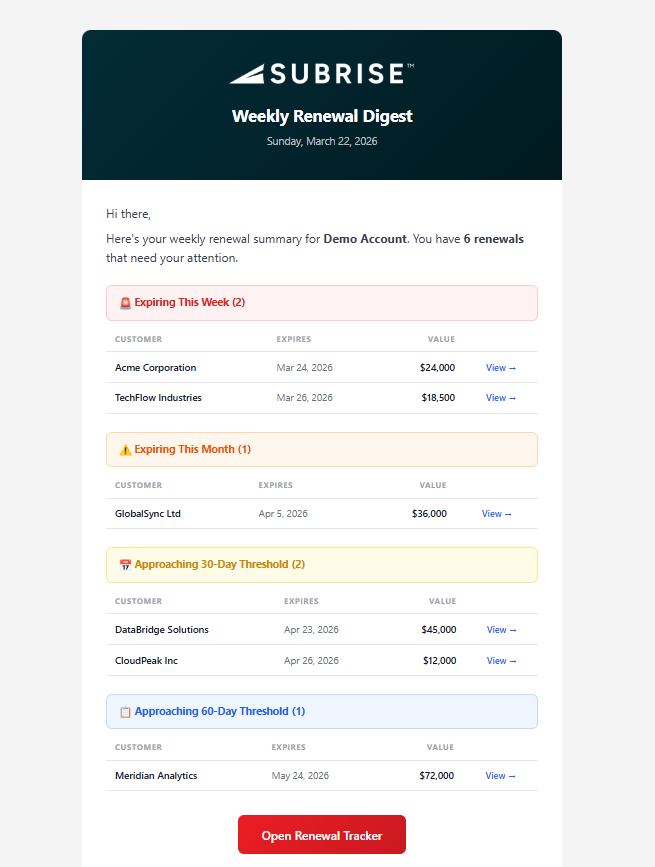
The Weekly Renewal Digest is an automated email sent every Monday at 7:00 AM in each user’s local timezone. It surfaces upcoming renewal transactions across four urgency bands, ensuring no renewal is missed.
Who Receives the Digest
Users with the Head of Business or Head of Customer Success persona receive the full digest containing all renewal transactions across the account. Assigned sales reps receive a filtered version showing only the renewal transactions matched to their sales code.
Urgency Bands
The digest organizes renewals into four color-coded sections:
- Expiring This Week (red) — Renewals with an expire date within the current Monday–Sunday week. These require immediate attention.
- Expiring This Month (orange) — Renewals expiring within the current calendar month, excluding those already in the “This Week” band.
- Approaching 30-Day Threshold (yellow) — Renewals where the expire date is 30–37 days from today. Many contracts include automatic renewal clauses triggered at the 30-day mark.
- Approaching 60-Day Threshold (blue) — Renewals where the expire date is 60–67 days from today. This is a common notice period for enterprise contracts and a key window for proactive outreach.
What Each Entry Shows
Each renewal entry displays the customer name (using the friendly name if available), the expire date, and the total expiring value in the account’s base currency. Entries link directly to the Renewal Tracker filtered to that customer. Only group-level summaries are shown — individual line items within a grouped transaction are not included to avoid duplicate information.

Timezone Settings
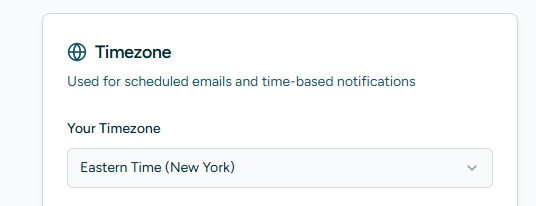
Each user can set their preferred timezone from their My Profile page. The digest is sent at 7:00 AM in whatever timezone the user has selected. The default timezone for all new users is America/New_York (Eastern Time).
Timezone can also be set during user creation in both the Team Management page and the Platform Admin > Users page.
Opting Out
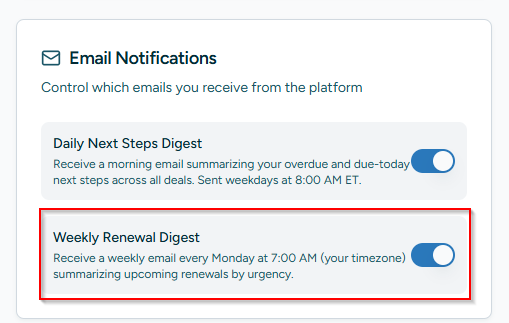
Users can disable the Weekly Renewal Digest from the Email Notifications section on their My Profile page using the “Weekly Renewal Digest” toggle. When disabled, no Monday digest emails will be sent to that user.
Completed Renewals
If a renewal listed in the digest has already been completed, the recipient should mark it as completed in the Renewal Tracker. Completed renewals are automatically excluded from future digests. Each email includes a reminder about this at the bottom.
Linked Navigation
Every customer entry in the email links to the Renewal Tracker page with the search field pre-populated to that customer name, allowing the user to immediately view all related transactions. The Renewal Tracker search field also supports URL parameters — navigating to /renewal-tracker/?search=CustomerName will automatically filter the table.