
Contracts give your team a single place to see what was sold, when it expires, and what replaced it — so nothing falls through the cracks between sales and customer success.
One record for every agreement
A contract groups subscription periods, transactions, and files into one record. Instead of chasing down renewal details across spreadsheets and inboxes, you now have a single source of truth for each customer agreement.
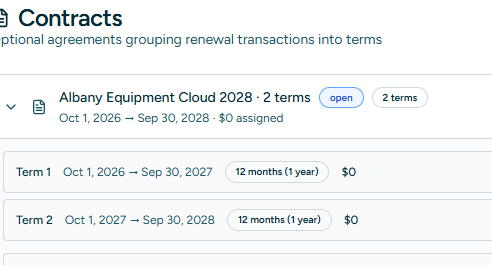
Terms that match real deals
Each contract supports multiple terms, and each term can include multiple transactions. This means complex agreements — co-terms, mid-cycle expansions, multi-year deals — are all tracked accurately.
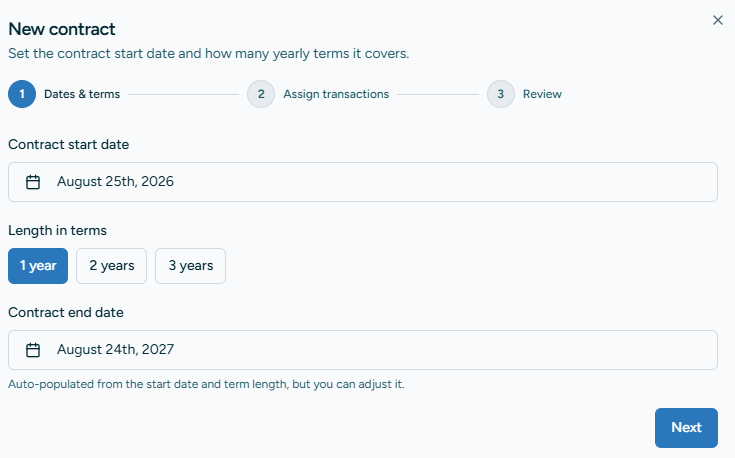
Automatic lifecycle status
Contracts start as Open and can be closed when a renewal is complete. You can also link a closed contract to its successor, so your team always knows what replaced what.
Files where they belong
Attach signed agreements, order forms, and any other files directly to a contract. Those files also surface in the customer hub, so anyone working with the account can find them.
Deep-linked from Renewal Tracker
Every contract is accessible from the Renewal Tracker, and transactions link straight back to their contract. Update it in one place and the change is reflected everywhere.

Try it on your next renewal
Open Renewal Tracker, find an expiring transaction, and create your first contract. Add a term, attach the transactions, and close it when the renewal is done.