
Not every opportunity follows the same path. New Sales Cycle controls let reps skip irrelevant steps, hide the noise, and keep the close date accurate – automatically.
Skip steps that do not apply
Every deal is different. A simple toggle inside the Sales Cycle modal lets you turn off any step that is not relevant to a specific opportunity.
When a step is skipped, it is removed from the timeline entirely. The remaining active steps slide back and butt against each other, so the plan reflects only the work that actually needs to happen. No more phantom stages cluttering the forecast.
- Toggle any step on or off per deal
- Skipped steps are hidden from the timeline layout
- Active steps compress to fill the gap
- Preference is saved with the deal record
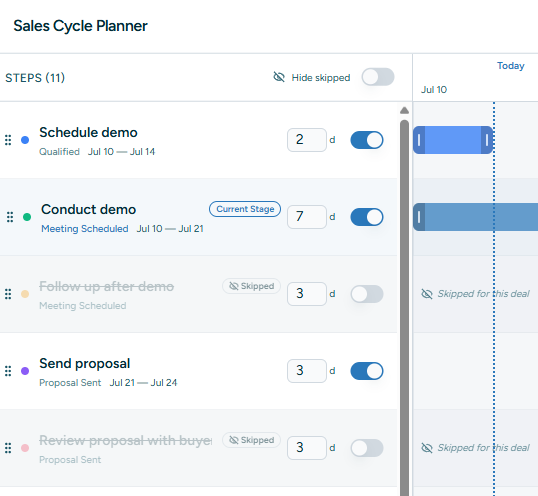
Hide skipped steps from view
Skipping is useful. Seeing a row of grayed-out skipped steps is not. A new “Hide skipped” switch removes them completely from the step list.
The control sits right above the toggle column, exactly where your eyes are when deciding what to include. Turn it on and the modal shows only active steps, making large or complex cycles far easier to scan. The setting persists across sessions, so your preference sticks.
💡 Why it matters Complex deals with many optional stages used to create visual clutter. Now reps can focus on the steps that drive the close, while the full history stays one toggle away.

Close date adapts automatically
Skip a five-day legal review and the cycle shortens. Add it back and it extends. The expected close date now recalculates in real time as steps are toggled.
The calculation respects business days and the remaining active steps. As soon as a step is enabled or disabled, the projected close date updates and syncs back to the deal record. No manual spreadsheet work. No stale forecasts.
- Real-time close date recalculation
- Business-day aware offsets and durations
- Synced to the deal’s expected close date
- Slippage tracking continues on the revised plan
“Plan Cycle” is now “Sales Cycle”
A small label change that makes the feature easier to find. The button in the deal drawer now reads Sales Cycle, matching the language reps already use in pipeline reviews.
🎯 Consistency The drawer, modal, and internal terminology all now refer to the same thing: the Sales Cycle. Less ambiguity, faster onboarding, and clearer reporting.
Try it on your next deal
Open any active deal, click Sales Cycle, and start toggling. The close date updates as you go — give it a shot on a deal with an unusual path.